Showing posts with label Merkur. Show all posts

Tuesday, July 20, 2021

Using an electric power steering pump to replace the factory Ford

The advantage to having an Electrohydraulic Power Steering (EHPS) setup is that you can pull the mechanical, belt driven pump off the engine. And, in my case, that will mean I will have one less belt to worry about in my XR4Ti since I relocated my alternator to the passenger-side of the engine, where the AC compressor would typically be located.

I've seen and heard people use the Toyota MR2 pump, but those are $300-400 at this point (mid-2021). There are companies producing "kits" with MR2 pumps as well, but then you're talking about $800-1200. 

This was pulled from the MCA Facebook group, to capture some other options for folks. 

As a couple of people have asked about the options for electric power steering I am posting what I have found out from various sources.

Most Japanese branded cars and SUV with electric steering works in Fail-Safe mode if the control unit (ECU) is disconnected from CAN BUS. Just like Hydraulic Steering, if the Electric Assisted Steering completely fails, the steering is back to completely manual mode maintaining car control.

The biggest advantage of using EPS from Toyota, Nissan and Kia/Hyundai is that the EPS works in Fail-Safe. The ECU for the column is mounted remotely and can be disconnected and removed. The EPS from Saturn Vue and Chevy Cobalt has the ECU that cannot be disconnected and must be de-soldered for remote mount. More importantly there is no Fail-Safe and a 3rd party eBay module is needed in order for it to work. Additionally , people have reported that with after market eBay module, the Saturn EPS does not self center the steering wheel coming out of a turn. You have to make constant corrections. No center feel.

Below is the list of cars that are known to have Fail-Safe Electric Steering. Only 3 wire connection. Ignition On, Power and Ground to the Steering ECU. That's it !

  • 2004-2009 Toyota Prius
  • 2009-2013 Toyota Corolla
  • 2006-2011 Toyota Yaris - (With ABS)
  • 2007-2009 Nissan Versa
  • 2009-2012 Nissan Cube
  • 2012-2014 Kia Soul

ECU Part Numbers:

  • 2004-2009 Toyota Prius 89650-47102
  • 2009-2013 Toyota Corolla 89650-02300
  • 2006-2011 Toyota Yaris - (With ABS) 89650-52120 / 52050
  • 2007-2009 Nissan Versa 28500-EM30A / 991-30303
  • 2009-2012 Nissan Cube 28500-1FC0B / JL501-000932
  • 2012-2014 Kia Soul B2563-99500 / 4PSG1312 / FPSG1312

The output shaft on Toyota is little larger than the rest and therefore the Borgeson 312500, 11/16 36 X 3/4 smooth bore weldable coupling should fits nicely. This couple fits the others as well. The Kia EPS is the biggest and appears to be most heavy duty. The Prius & Corolla EPS are very easy to find at salvage yards so this is the best bet. 

Note: As with any modification, there are risks.

Now, I don't know how much abuse these will handle, meaning, will they last under heavy usage for a drift car? I don't know. I'd love to hear people's experiences, if you have any.


Saturday, December 12, 2020

Throwback: Head Porting By David Godfrey

David Godfrey's Article About Head Porting

David Godfrey is somewhat of a legend in the XR4Ti circles, being a prolific problem solver and fabricator, he came up with some good solutions to deficiencies in the XR4Ti platform. In this case, he's documented how he thought about and went through with getting the head ported. 

David no longer maintains his website, so I pulled this out of the Internet archives to give it a new place to live, so people can see it, and take some inspiration from his ideas. 

Chris


Purpose

I proposed to the MCA folks giving this seminar so that perhaps some of the DIY types might have a game plan on a possible way to port their own cylinder head. Hopefully the results of this seminar will be that this individual will be able to act as their own general contractor and be able to oversee the cylinder head rebuild.

Qualifications

I have been tinkering with cars, motorcycles, bicycles, radio control sailplanes, etc, for all my life. I have probably built at least 25 motors, some of them when I was working for a speed shop but most of them for myself. I have never built a motor for my personal use, even on a daily driver, where I did not port the cylinder head. I ran the IHRA points circuit and set 6 national record with a modified compact Pinto. This car had a 2.0L normal aspirated motor coupled to a Doug Nash 5 speed. Prior to that I ran a 67 Shelby GT500 with a boss 351 Cleveland motor. This car ran in what was then called formula 2, B modified, which is a single 4-barrel class. There were restrictions on the amount the motor could be modified, and, of interest to this topic, particularly how much the heads could be modified.

Safety

Porting cylinder heads is rewarding but nasty work. Running the die grinder for the amount of time required is a carpal tunnel syndrome sufferer's nightmare. I know cause I have it! As a minimum ear plugs, safety glasses, and a mask is required.

Since March I have ported three 2.3 heads and manifolds and have been to the eye Dr. twice to get particles removed from my eyes. This is with using safety glasses. The first time a shaving got up underneath my glasses. I switched to protective goggles and got a particle in my eye anyway. I think it occurred when I pulled the goggles off and something fell out of my hair. Now I brush out my hair and dust of my clothes before I pull the protective gear off.

Tools

The main tool required is some type of grinder. I have used both electric and air powered grinders and my current preference is the air-powered grinder. I have a 110v 1-horse compressor that works fine. It runs all the time, but it works well.

For rough in type work I have several different types of carbide burrs. Note there are burrs for aluminum and steel. Aluminum burrs have fewer teeth. If you use a steel burr on aluminum be prepared to spend a lot of time cleaning the aluminum out. If you use an aluminum burr on steel it will chatter and dull quicker.

I also have several different shapes of burrs on different length stems. I tend to do most of the rough in work with the large "tree" shaped burr.

A couple of old valves have been ground down on the face that I use to protect the valve seats when working the combustion chamber.

I use several different types of cartridge or sanding rolls for the finish work. I tend to use a lot of the 3/8 diameter 60 grit rolls when working the valve pocket. I will go to 180 and 240 grit rolls for final polish.

When you are using the rolls remember that most of the work is done on the tip of the roll. They will were out fairly quickly so change them often. A worn out 60-grit roll does not become a 120 or finer grit roll; it becomes a worn out 60-grit roll. The "teeth" wear down and the cutting action becomes more of a burnishing effect. One can waste a lot of time trying to use a dulled cartridge roll.

The big diameter rolls are handy for smoothing out bumps and removing casting flash. If there is a ridge in the port such as where the mold seams meet the small diameter rolls will tend to fall on one side or the other. The big diameter rolls really do a nice job of making things round.

I also have a couple of different length arbors. The long arbor is used for intake manifolds and working the short side radius. The short ones are used for general work. The disadvantage of the long arbor is it tends to vibrate more, especially with large diameter rolls.

You will see porting kits from places like Summit or Jegs. I would suggest you get your supplies from an industrial supply house or MSC or McMaster Carr. I buy the 3/8 diameter rolls in bags of 100. Also get a roll of emery cloth to use for smoothing the short side radius.

Concept

Most of ya'll probably don't remember this, but back in the early 80's both the NHRA and IHRA had single 4-barrel modified classes. In NHRA they called it super modified. IHRA called it formula 2. These classes had restrictions on the amount of cylinder head work that could be done. They would let you match the intake manifold gasket to the head, but the matched area could not extend more than 1/2" into the port. The bowl are could be worked also, but again, the reworked area could not extend into the port more that 1/2" from the valve seat. The combustion chambers could be reworked as needed. It ended up that the main benefits or power increase was due to rework within 1/2" from the valve seat. This holds true for most cylinder heads.

You can see from the head sections I have that the port is very flat, actually it is parallel to the head gasket surface. You can also see how much material there is around each port. The amount of benefit one can get from porting is limited due to the starting point. No amount of grinding is going to transform this casting into a super breather comparable to today's motors. A significant increase can be made, but recognize the limitations of the design from the start.

Port layout

Recognize that no amount of grinding is going make this into a Vtech head, so instead concentrate on removing obstructions to flow around the valve seat. Keeping with the super-modified rules, reworking the port within 1/2" of the valve seat, is not a bad rule of thumb. The 2.3 head is pretty ugly in this area and the main benefits to be gained will occur from working this area.

When Rick Byrnes went to the Esslinger head on his race car he got a 20% power increase using the same valve size and cam. This increase is due entirely to the port shape. In Rick's case he was able to run 20% less boost and get the same power. The overall shape of the 2.3 head has been determined by Ford. All you can do is try to clean it up. Where I live folks have been racing mini-stockers for years with 2.0 and 2.3 Ford motors. I have seen some pretty radically modified heads show up at my friend's machine shop. These include heads that have had steel tubes furnace brazed in place to change the angle where the port enters the head. Some of these modifications had varying degrees of success, but most were a lot of trouble for little gain. This is due to the base, early 1970-'s design of the head.

I tend to leave the intake port shape and general size alone and except for the bowl area just clean it up. You can see from the head sections that there is no a lot one can do to change the port shape. The exhaust ports get more work. I increase the diameter of the port and reposition it upward. I use to do this by hand, but on the last two heads I've done I did the majority of the work on a milling machine. I set the head up and bored the port to 1.375" diameter with the bottom of the diameter tangent to the existing port floor. I took this to a depth of 1.10" into the port. The remainder of the port was worked with carbide tools and cartridge rolls.

Combustion Chamber Layout

The 1/2" valve seat rule of thumb works on the combustion chamber side as well. There are some obstructions that can be removed or blended and some you can't. The main restriction to flow, especially at low valve lift, is the side of the chamber next to the quench area. This restriction gets worse when big valves are installed. Opening this area up is called unshrouding the valves. One thing you can't to anything about is where the cylinder shrouds the valve. A big valve makes the shrouding worse in this area.

When reworking the combustion chamber I put dykem blue on the gasket surface and then bolt it to a bare block. I then reach up into the cylinder and scribe the cylinder bore to the head. This scribe line defines the "stay out zone". I then scribe lines on the head indicating where I will unshroud the valves. The rough in work is done with the small round and tree shaped carbide cutters. I then use the cartridge rolls to blend and smooth all the surfaces.

Intake Manifolds

There are several areas in the intake manifolds to rework. The main problem area is the ports at the head surface are way undersize. Ford did this to ensure there was no obstruction into the port. The manifold can be opened up significantly to match the head.

To transfer the head port shape accurately to the intake I use a template. Do not try to match to the intake gasket! It is grossly oversize. If the head and manifold are matched to the gasket you will end up with a configuration where the charge air will expand and then be funneled back down. The expanding part is not bad, but the squeezing back down is.

I make a template of the ports by taping a piece of card stock to the head and then using an Exacto knife cut out the port shape and a couple of the mounting holes. With the template still taped to the head I bolt on the intake manifold and scribe or cut the template to match the outside of the intake mounting flange. This gives me a good point of reference of where to place the template on the manifold. I then remove the manifold and template, put dykem blue on the manifold gasket surface, align the template and scribe the port shape to the manifold. Using the carbide cutters the intake can quickly be opened up. After grinding on cast iron one can appreciate working with aluminum.

The lower intake has pretty severe projections into the port on runners 2 & 3 where the fuel injectors plug in. I remove these by TIG welding the outside of the manifold and then smoothing out the bumps inside the ports. They cannot be completely removed, but they can be made a lot better. Epoxy such as Devcon or JB weld can be used instead of welding. Both these epoxies will hold up well.

The runner junction in the upper manifold is another ugly area. I gain access to it by cutting the manifold apart. The junction can then be smoothed and the manifold TIG welded back together. Some folks remove runner walls completely. This would not be my choice for a street motor, but if I were to do so I would still cut the manifold apart to make it easier to get to.

Exhaust manifold

The exhaust manifold ports can be enlarged to match the head by using a template similar to the intake manifold. There are some rather nasty corners and bumps to clean up at the port. I do this using the large round and tree shaped carbide burr.

The opening to the turbo needs to be matched to the stainless steel gasket. This is a lot of grinding but well worth it.

One area to look at is the turbo outlet. I open this up to the inside diameter of the down pipe.

Head Rework Process

I mentioned that the purpose of this seminar was to provide the DIY types with enough info to do their own head porting and oversee the machine work. The steps I use are as follows.

1) Disassembly and Inspection

No special tools are required to take the head apart. A valve spring compressor is handy, but not necessary. A large socket and whuppit (hammer for city folk) can be used to remove the valve keepers. Placing the head on a surface with the springs pointing up. Put the socket on the retainers and smack it with the whuppit. The retainers will pop out. Remove the springs and valves and inspect the seats for cracks. Some cracks can be repaired by a method called posting. Not all cracks can be repaired so it's best to get the machine shop to inspect and magneflux the ports. Most cracks will be in the exhaust seats. Have the machine shop check the valve guides also. It's hard to get a feel for how good the valve guides are until the head has been cleaned.

2) Machine shop tasks, first round.

When the head has been disassembled I take it to the shop for the following task's to be performed. I get the cam bearings removed and the head hot tanked or cleaned. The guides are checked and the seats magnefluxed. If guides are necessary they are replaced at this time. The exhaust seats are then cut and seats for the oversize exhaust valves are installed. The intake and exhaust seats are then roughed in for a 3-angle valve job. Also get the intake manifolds degreased.

3) Porting

When I pick up the head and manifolds they are ready for porting. As I mentioned earlier I lay out the cylinder diameter and scribe the combustion chambers. If there is not an bare block available to scribe the cylinder diameter a head gasket can be used but keep in mind the diameter of the fire ring on the gasket is larger than the cylinder diameter. The lines you scribe will have to be adjusted to provide for the proper reference lines.

The exhaust ports can be layed out and either worked by hand or on a mill. If you have no access to a mill the job can be farmed out. I did two heads including set up and cleaning the work area in an hour.

Working the short side radius is the biggest problem. Its hard to get it nice and round. I rough it in as good as possible using the die grinder and then smooth it using what I call the shoeshine method using the emery cloth from the shop roll. I tear the emery cloth into a strip about 24" long and 1/4" wide. The strip is then placed through the port and drawn back and forth in a manner similar to shining a shoe. Any ridges can easily be smoothed down.

When the intake and exhaust ports are done the templates can be made and the port pattern transferred to the manifolds.

4) Machine shop task's, second round.

When all the port work is done the head and valves are returned to the machine shop for the final valve job and cleaning. The seats are cut to the final dimension and the valves are back cut. If an after market cam is used make sure the retainer to valve stem seal clearance is checked. If necessary the end of the guide can be shortened. After the valve work is done the head gasket surface is level cut. If needed the intake and exhaust manifold surfaces can be cut as well. When all machining is complete the head goes back in the hot tank for final cleaning. The head is then ready for assembly.

Conclusion

I hope this has been of benefit to those who would like to do some of the work themselves. If the task seems to large or is to intimidating as a minimum rework the valve bowl area to remove the ridges and sharp edges and then port match the intake to the head and the turbo to the manifold. Even if stock valves are used clean up the valve bowl. I hate to put a number on it, but probably 75% of the advantage of a ported head is due to work in these areas.

Tell the guy at the machine shop what your plans are and most will work with you. If not find a shop that will. I have been doing this for many years and have used several different shops with good results. So be brave and try it!

Tuesday, December 8, 2020

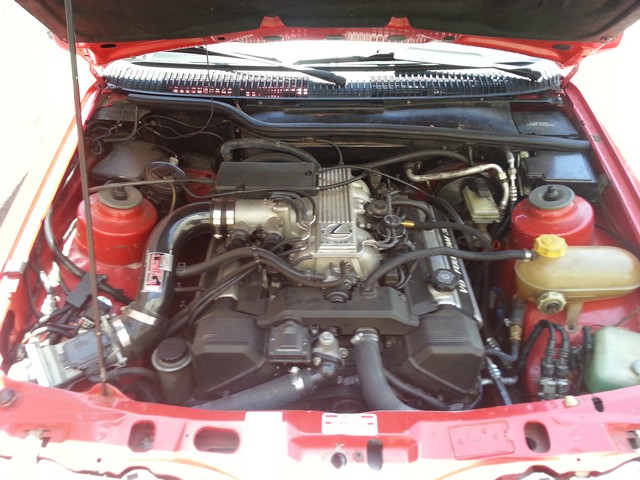
Repost: 1985 Merkur XR4Ti with a naturally aspirated Lexus 1UZ-FE V8

This story starts with an all too common beginning, with someone wanting and obtaining an XR4Ti, but wanting more "push you into the seat" acceleration from the front-engined, rear wheel drive, coupe platform. While the 2.3Turbo Lima-block-based platform can be improved over stock with not a lot of effort and parts, that won't give you "eyeballs pushed into the back of your head" acceleration. Engine swaps are a common conversation, most frequently with the Ford 302/5.0, but some people have tackled more exotic power plants like the always suggested LS, to Ford 2.3l Duratec and others. 

1985 Merkur XR4Ti with a Lexus V8


Craig Thommes had always wanted a Merkur XR4Ti and found one in good condition in Arizona 10 years ago. The factory 2.3 L turbo Lima inline-four was worn out so he rebuilt one with more power. Eventually Craig grew to want more power and dependability as a daily driver.
1985 Merkur XR4Ti With A Lexus 1UZ-FE V8
Craig turned to Jake Reed to work on the solution. Jake has a lot of experience working with the Lexus 1UZ-FE V8 and once the team realized it would fit, it only took Craig one look at the 1UZ power band to decide. To get the engine to work Jake had to make a custom oil pan and custom mounts for the motor, transmission, radiator and fans. He was also able to get the Merkur automatic shifter to work with the Lexus A340E automatic transmission.
A Lexus 1UZ-FE V8 inside a 1985 Merkur XR4Ti engine bay
This car was intended to be daily driven so everything had to run with factory dependability. That required a lot of wiring by Craig to make sure everything works as it should. He also kept the air conditioning because no one wants to sweat on their drive into work in the summer. A Lexus SC400 cluster was installed which gave the dash a factory look and allowed all car’s vitals to be monitored by the driver.
Lexus SC400 gauge cluster inside a 1985 Merkur XR4Ti
Another goal was for the car to pass all California emission tests. Craig was happy to find it passed easily and now sports a window sticker by the California Environmental Protection Agency Air Resources Board.
A Lexus 1UZ-FE V8 inside a 1985 Merkur XR4Ti engine bay
1985 Merkur XR4Ti With A Lexus 1UZ-FE V8

Friday, October 4, 2019

The infamous blower motor resistor issue

Why is my HVAC fan only working on one speed, or blowing a full blast? OR All about the thermal fuse, blower motor, and the parts number

If you have what appears to be the low speed, that may just be the air recirc. door opening due to a non-functional door solenoid. It is uncommon for only the middle speed not to work, since the failure of a blown thermal fuse is that only the top blower fan speed works.

The resistor pack is located beneath the plastic cowl cover behind the firewall in the engine compartment. Four or five screws to remove the cowl, and two screws to remove the pack, and a connector. The pack sits on top of the heater fan box. Just look for a plate held in with two screws and a wiring connector. Once removed, you'll see two or three coiled wires and a thermal fuse mounted on the other side. The thermal fuse is the culprit. 

You can either:

A) Repair with a 291.2 degree F (144 degree C) thermal fuse. (Radio Shack part #270-1322a or newer #270-1320). Don't solder it in. It MUST be crimped in, or the heat from soldering it will blow the resistor. You can cut the body of the old fuse off and twisted the leads of the new one to the leads of the old one. All speeds to the blower should work after this repair.

OR

B) Solder in series a 10 amp fast blow fuse. 


Wednesday, May 29, 2019

Repinning your harness to put an LA3 into a Merkur


There are more detailed, complete instructions at Merkurencyclopedia.com. 

These are the pins that you have to move to put an LA3 into your Merkur:
1. Pull out pin 43 and move it to pin 27. This connects the VAF signal. 
2. Pull out pin 25 and move it to pin 43. This connects the VAT signal. 
3. Pull out pin 32 and move it to pin 31. This connects the boost controller. 
4. Pull out pin 35 and insert it into pin 33. This connects the EGR solenoid signal. 
5. Put a spare pin into number 24 and run it to Signal Ground which is pin 46 for permanent premium mode. Or install a switch so that you can switch between premium and regular modes.

You don't need to hook up an Air Charge Temperature (ACT) sensor. You don't need to hook up the Brake On/Off (BOO) switch. And you don't need to do anything to keep the cruise control working. The cruise is a completely separate system from the EEC-IV in a Merkur. No modifications necessary. 

Thursday, May 2, 2019

Throwback: MerkMeter User Guide

Since I have a gauge cluster with a MerkMeter and needed to understand what it was, how it worked and how to reinstall it, I had to go find information about it. I finally found information and had to pull this out of the WayBack Machine, I figured I'd post it here, so there's a live website for this content again.

Chris

MerkMeter User Guide

Rationale 
The exhaust gas oxygen (EGO) sensor is a crucial part of the engine management strategies of virtually all modern cars.  It basically enables the Engine Control Unit (ECU) to properly manage the fuel flow in response to changing engine operating conditions.  Responding to these changing conditions rapidly and accurately is a key component of the operating strategies employed by the software embedded in the ECU.  An improperly operating EGO can result in poor fuel economy, higher emissions, and poor drivability and performance.  Also, insight into the data a properly functioning oxygen sensor is sending to the ECU can be invaluable in monitoring the runtime health of the engine and diagnosing trouble when it occurs.  Just as a hot running engine, as indicated by the coolant temperature gauge in the instrument cluster, can be an indicator of serious problems, so too can an abnormal air/fuel ratio as indicated by the proper gauge.


Theory of Operation
The EGO sensors in our cars basically measure the difference in the oxygen content of the exhaust gas against that of the ambient air.  The air we breathe is about 21% oxygen.  The oxygen content of the exhaust gas of our cars is typically in the 0-2% range.  A small zirconium dioxide thimble in the oxygen sensor can generate a small voltage that reflects the difference in the oxygen in the exhaust (outside the thimble) vs. the oxygen in the ambient air (inside the thimble).  The greater this detected difference, i.e. the less oxygen in the exhaust gas, the higher the voltage produced by the sensor.  

For this type of EGO sensor to work, it must be heated above 600° F.  The exhaust gases passing over the sensor tip in the exhaust pipe accomplish this heating.  It generally takes about 2 minutes with the engine running above 2000 rpm for the EGO in an XR4Ti to be brought up to operating temperature. The Scorpio uses a Heated Exhaust Gas Oxygen (HEGO).  The HEGO, as the name implies, is brought up to operating temperature somewhat quicker due to an internal electrical heating element.  Output from both types of sensors is comparable. 

A new EGO sensor will output from zero to about one volt and can detect changes in the oxygen content of the exhaust very quickly.  These sensors are particularly sensitive around the ideal air/fuel mixture of about 14.7:1, which results in stoichiometric burn.  This is the ratio at which there is theoretically just enough oxygen to burn all the fuel.  (In practice the burn is never completely efficient and some residual oxygen will always be present in the exhaust).  The stock Bosch EGO sensors (or equivalents) generate approximately 0.45 volt at this mixture.  A voltage below 0.45 indicates a lean condition, while a voltage above 0.45 volt indicates rich. 

How does the EGO output voltage correspond to an air/fuel ratio value?  The answer to this question is dependent on many variables; the age and condition of the EGO, the fuel used, the operating temperature of the EGO among them.  Representative data from Bosch is shown below for a new zirconium dioxide EGO operating at 800-1200°F with an engine burning gasoline containing no alcohol:

Voltage
Approx. Air/Fuel Ratio
0.0-0.1
17.0:1
0.1
16.0:1
0.2
15.5:1
0.3
15.0:1
0.4
14.8:1
0.45
14.7:1
0.5
14.6:1
0.6
14.5:1
0.7
14.2:1
0.8
13.2:1
0.9
12.5:1
>1.0
12.0:1 or less


As a sensor gets older the maximum voltage it can generate and its sensitivity to changes may decrease.  Also if the sensor becomes contaminated with lead, silicone, or antifreeze residue it may become very inaccurate.  Bosch recommends that unheated oxygen sensors (XR4Ti) be replaced every 30,000-50,000 miles.  First generation heated sensors (Scorpio) should be replaced every 60,000 miles.

The sensitivity and responsiveness of the EGO makes it possible for the ECU to dynamically adjust the air/fuel ratio. When the engine has warmed, as indicated by the Engine Coolant Temperature (ECT) sensor, the ECU will go into “Closed Loop Mode”.  This is a feedback mode in which the ECU will actively vary the fuel supplied via the injectors based upon the EGO signal.  When a lean condition is indicated by the EGO, the ECU will increase the amount of fuel supplied by the injectors.  If the EGO shows the mixture is rich, the ECU will reduce the fuel supplied.  The ECU will make the necessary calculations and dynamically adjust the mixture continuously while in Closed-Loop Mode as much as several times a second.


MerkMeter Behavior
The MerkMeter is essentially just a small voltmeter calibrated to a range of zero to one volt.  Each LED indicates an increment of 0.1 volt.  The leftmost red LED will light when the voltage from the EGO is about 0.1 volt.  The leftmost yellow LED lights at about 0.4 volt and the leftmost green LED lights at about 0.7 volt.  The rightmost red LED will light at or above 1.0 volt.  There is about 10 millivolts overlap between adjacent LEDs.  For example, a value of 0.69 volts will light both the rightmost yellow LED as well as the leftmost green LED.

What the MerkMeter displays depends upon the operating conditions of the engine:

Cold Engine
When the engine is cold, the MerkMeter will gradually display an increasing voltage as the EGO sensor warms to operating temperature.
Closed-Loop Mode
The MerkMeter will show this mode as a display that oscillates from about 0.1 volts to 0.8 volts and back again. When at idle the crossover time from lean to rich and back to lean might be about one second. At part throttle cruise, the crossovers might occur several times a second. The range and speed of these Closed-Loop oscillations can be an indicator of the health of the EGO. If the range of oscillations is considerably less than normal, or is skewed toward one end of the range or the other, oxygen sensor deterioration or contamination might be indicated. The same condition could cause the crossover rate to slow. A car that never goes into Closed Loop Mode might have some other faulty sensor or ignition circuit. The XR4Ti will operate in Closed-Loop Mode only below 2950 rpm.

Open-Loop Mode
In this mode, the ECU does not use the EGO signal to calculate how much fuel to supply. It instead supplies a fixed amount of fuel based upon other parameters. The MerkMeter will display a stable, slightly rich reading normally in the 0.7 to 0.9 volt range. This will most often occur when cruising above 2950 rpm (XR4Ti PF2/PF3 calibration).

Wide-Open Throttle
At Wide Open Throttle (WOT) the ECU will also go into Open-Loop Mode. The MerkMeter will normally display a steady rich reading in the 0.7 to 0.9 range for the duration of the WOT event. If the MerkMeter drops into the 0.1-0.3 volt range at WOT, it is a good indication that insufficient fuel is being supplied to meet the engine demands.

Specifications
Display Driver:  National Semiconductor LM3914N
Fuse Protection:  0.5A fuse
Polarity Protection:  50V silicon rectifier diode
Voltage Requirements:  6-15V DC
Operating Current:
       No LEDs on -  ~5mA
                               One LED on -  ~15mA
                               All LEDs on -   ~95mA maximum
Signal Input Current:  Less than 100nA

References
The Complete Turbo 2.3L EEC-IV Handbook by Allan Slocum
Ford Fuel Injection & Electronic Engine Control by Charles O. Probst
Oxygen Sensor Technical Data Sheets by Bosch
Oxygen Sensor Diagnosis Olympic Imported Parts Corporation
Oxygen Sensor Information by Rick Kirchoff
Understanding Oxygen Sensors by Dave Cappert (broken link @  www.serviceinsights.com)
What is an oxygen sensor?” from Bosch REPORTER: Written by Technicians for TechniciansOctober 1998

Throwback: About the MerkMeter

Since I have a gauge cluster with a MerkMeter and needed to understand what it was, how it worked and how to reinstall it, I had to go find information about it. I finally found information and had to pull this out of the WayBack Machine, I figured I'd post it here, so there's a live website for this content again.

Chris

MerkMetertm     Merkur Air/Fuel Ratio Gauge


  • Graphically displays the output of the existing oxygen sensor
  • Patent pending design fits in the stock instrument cluster...No additional gauge pod is required!
  • One year warranty
  • Fits in all model year XR4Tis and Scorpios
  • All wires and connectors needed for installation are included in the kit:
  • Detailed and illustrated printed instructions included
  • Installs with simple hand tools in less than one hour
  • Three color display permits monitoring information in the driver's peripheral vision 
  • 10 segment display is calibrated for .1 volt per segment with a 1 volt range
  • Built-in fuse protection
  • Built-in battery reversal protection
  • Display can be configured in Dot or Bar Modes
  • High impedance precision circuitry will not effect oxygen sensor output to the ECU
Price was $74.99 (USD) for members of the International Merkur Owners Network, the Hardcore List, the XR4Ti List, the Merkur Club of America or any of the other Merkur clubs or organizations listed on the Merkur Desktop.

Price for others was $89.99.

Common Merkur issues and recommended fixes

Found this elsewhere on the Internet (on that classic DIY website hosting company angelfire of all places) but thought it was worth reposting since my custom domain name isn't going away any time soon, Blogger isn't going to go away any time soon, and neither am I. Well, I guess that's what we all think. Ha ha.

So, here it is, the common issues and common first things to try to resolve them on your Merkur XR4Ti.

Driveshaft torsional dampener or guibo
  • It is not a U-joint. It must be in perfect shape with no cracks. The driveshaft must have zero degrees runout when checked at the guibo or it will deteriorate quickly. 
Rear brake lights
  • The ground wire which is brown in the connectors will corrode and short out the adjacent connectors. Remove the bad ground wire in the light panel and solder a wire onto the light bulb holder that is directly connected to this ground wire. 
Valve cover gasket
  • Recommended: The Ranger gasket works well and is reinforced with steel so that if the top end is getting pressurized it will help to stop the oil from leaking out. 
  • Also works: Use the blue silicone rubber Fel Pro gasket to eliminate oil leaks onto the exhaust manifold.  
Leaking sunroof
  • Blow out the drain lines that connect to the pan in the roof. If this doesn't help then you need to fix either the drain hoses or the drain pan. 
Bad window switches
  • Take apart the switches and clean them or buy good used ones. 
No rear view mirror
  • Buy the correct Ford rear-view mirror attachment kit. 
Poor performance
  • Usually ignition parts. 
Yellowed headlights
  • Normal polish and refurbish. Polish the plastic lenses with a plastic polish. 
Broken hazard flasher
  • Only real option is to find a used one in good shape. 
Broken hatch lock
  • Find a good used one in good shape. 
Wetness in the car after it rains
  • Either fix the sunroof drain tubes or the tail light gaskets. 
Inconsistent idle
  • Clean the ENTIRE intake tract until all carbon is gone. Replace all the gaskets. Set the base timing, base idle, then the TPS. 
Heated seats don't work
  • Fix the small wire in the back of the seat. Both heaters are hooked together, If one doesn't work then the other won't work. 
Hard leather seats
  • Use a good saddle soap multiple times to restore the moisture into the leather. Maintain the leather regularly. Window tint will help stop the sun damage to the seats. 
Gauges don't work
  • Usually a cold solder on the daughterboard. This is located on the back of the instrument cluster. 
Oil blowing out of the engine
  • The Ford PCV valve is not adequate to hold the boost from entering the crankcase. Add a good one way valve in line with the stock valve to stop the boost from entering the crankcase. A brass brake booster valve will work well for this. Also the dipstick is not calibrated correctly. Put in a new filter and five quarts of oil. Run the engine for one minute and shut it off. Let the car sit for 30 minutes and check the oil level. Mark the correct level line on the dipstick with a file mark. 
The buzzer in the dash goes off whenever you step on the gas
  • This probably means that the Wastegate Actuator is bad. Cost: between $50-90 dollars. 
Front end shimmys at different speeds
  • Replace all the front end bushings and balance the wheels and tires as a start. 
Door rattles when it's closed
  • The track may be broken. Very common on the drivers side door. Weld the track back together or find a good used one. 
Bad radio reception
  • The wire that runs to the antenna in the rear decklid glass frequently breaks. Replace it. 
Automatic Transmission leaks
  • The factory cooler is way too small. Replace it with the biggest one you can afford and bypass the one in the radiator. Also the dipstick tube leaks where it goes into the trans. You can fix this by removing it and wrapping it with Teflon tape and reinstalling it. 

Saturday, April 20, 2019

Throwback: MerkMeter Installation Instructions


I happened to acquire one of these recently and had to go digging for the instructions. Given the website has been dead for 15 years, I am reproducing the instructions here for others to benefit. Good luck with your Merkur!

Chris


    MerkMetertm Installation Instructions:   XR4Ti
    Introduction
    Installation is very simple and should easily take less than one hour.  Installation of the MerkMeter basically involves removing the instrument cluster, inserting the meter into the preexisting slot, running a wire (provided) to the computer, and connecting this wire to the oxygen sensor signal wire at the computer wiring harness.  Most of the time required will be spent in removing and replacing the instrument cluster.  

    Please read through these instructions completely once before proceeding.  Although they may appear lengthy, we have just tried to be thorough and not assume any previous experience on the part of the installer.  


    CAUTION: Although the MerkMeter has not been shown in practice to be sensitive to damage caused by static discharge, it does have a semiconductor component.  As such, care should be taken to handle the MerkMeter outside its protective anti-static bag as little as possible.  Under no circumstances should it be handled while an electrical source is connected.


     Tools Required:
    • Philips head screwdrivers
    • 7mm nut driver or socket
    • Pliers
    • 19 mm open-end wrench (For late model cars with cruise control)


    Step One:  Remove Instrument Cluster
    Note: The step order outlined here may be slightly different than that described elsewhere, but is the easiest procedure we have found in removing many XR4Ti instrument clusters.  TIP: Before removing the instrument cluster check for any malfunctioning light bulbs.  Now would be a good time to replace them.  
    1. Remove screw from upper steering column shroud and remove shroud.
    2. Remove three screws from the bottom of the lower steering column shroud and remove the shroud.  Note: One screw is near the steering wheel and two are at the hood release latch.
    3. Remove four screws retaining instrument cluster bezel.  Carefully pull bezel free and remove the panel illumination control and intermittent wiper control rheostats.  TIP: Carefully push these controls out the front of the bezel and disconnect them from their wiring harness by gently pulling on the connector.
    4. Remove four screws holding instrument cluster to dash and pull cluster towards the steering wheel.  Do this gently and only far enough to allow your hand to reach behind the left side of the cluster.
    5. Remove the turbo boost gauge vacuum line by pulling it free of the nipple on the back of the instrument cluster.  TIP:  If this hose is old, it may be necessary to twist it a bit to pull it free.  The OE hose frequently develops a leak near the connection with the nipple, so now would be a good time to replace this hose if it is old.
    6. Disconnect the cluster wire harness by gently pulling on the connector.
    7. Locate the speedometer cable connector where it is attached to the back of the instrument cluster.  While pressing on the “button” on the side of the white plastic cable latch, gently pull the cable free of the cluster.  The cable should come free easily without much required force.  TIP: In later model cars equipped with cruise control there is little or no slack in the two-piece speedometer cable.  It will be necessary to disconnect the cable inside the firewall (near the fuse box) using a 19mm wrench.  Only pull the cluster far enough to disconnect the cable as described above.
    8. Remove cluster from dash.


    MerkMetertm Installation Instructions:   XR4Ti
    Step Two:  Configure MerkMeter
    Dot  / Bar Mode


     The MerkMeter can be configured to display in either Dot Mode (one light at a time displayed) or Bar Mode (current reading and all lights below are on).  The MerkMeter is shipped with Dot Mode as the default and is the recommended mode.
    To set the MerkMeter to operate in Bar Mode, install the shorting jumper on J1 (See Figure 1) across BOTH pins.  
    Instantaneous / Dampened Mode
    How quickly the MerkMeter display responds to changes in the output of the oxygen sensor can also be set.  In Instantaneous Mode the MerkMeter will display the voltage changes in the oxygen sensor immediately.  While in Dampened Mode, the MerkMeter will not be as quick to change in response to changes in the oxygen sensor output.  The MerkMeter is shipped with Instantaneous Mode as the default and is the recommended mode. 
    To set the MerkMeter to operate in Dampened Mode, install the shorting jumper on J2 (See Figure 1) across BOTH pins.


    Step Three: Install MerkMeter in Instrument Cluster  

    1. Remove panel insert from the back of the instrument cluster.  Simply squeeze the tab to unlock and slide out the insert blank. (See Figure 2)
    2. Remove the protective paper from the two self-adhesive pads on the MerkMeter.
    3. Carefully slide the MerkMeter into the slot in the back of the instrument cluster with the adhesive pads facing up.  (The side with the electronic components will be on the bottom.)  When properly installed, the three red LEDs will be on the left when viewed from the front.  Be careful not to allow the adhesive pads to stick to the cluster yet.
    1. Continue to slide the MerkMeter into the slot until the display socket of the MerkMeter is securely pressed into the opening and is flush with the front of the panel.
    2. Carefully and firmly press upward on the back of the MerkMeter to allow the adhesive pads to stick to the two small plastic tabs at the top of the slot while ensuring the MerkMeter remains in the proper position.  NOTE: The meter may also be secured using the large white wire tie.  The wire tie should be routed through the hole on the MerkMeter and the eyelet on the tie then secured to the hole just above the mounting slot with a suitable screw (not included).  It is easiest to place the tie through the MerkMeter hole first and only tighten it slightly.  Then the screw should be inserted through the eyelet and threaded into the hole a couple turns.  If you keep as much slack as possible in the tie, you can rotate the MerkMeter and insert it into the mounting slot.  When the meter is in position, the tie can be slowly cinched down as the slack is carefully worked out of the tie. The screw should then be threaded the rest of the way into the hole.  Do not over-tighten the tie or the screw.
    3. Remove the nuts from the electrical supply studs on the back of the cluster indicated in Fig 2 as “Power” and “Ground” using a 7 millimeter nut driver.
    4. Attach the RED wire to the stud indicated in Fig 2 as “Power” and secure it with one of the nuts.
    5. Place the BLACK wire on the stud indicated in Fig2 as “Ground”.  Also place the tab adaptor used to secure the BLACK ground extension wire onto the same stud.  Attach wire and tab with the remaining nut.
    6. Attach the spade connector on the BLACK ground extension wire to the chassis grounding screw on the dash support bracket directly behind the instrument cluster. Loosen the screw a few turns, slide the spade connector under the screw and retighten the screw.  NOTE: This extra ground wire is needed since the instrument cluster ground Ford provided via the stock wiring harness is inadequate.
    7. Check again that all wire connections are correct. Ensure that the ring connectors are not in contact with any other nearby studs.  Be sure the chassis ground screw is tight and all wires are secure.
    8. Remove the sound-deadening panel from beneath the glove box.
    9. The male connector end of the oxygen sensor signal wire should be carefully routed from the cluster, through the dash opening, and down and under the center console to the passenger side foot well area.  (It may also be possible to route the wire down and through directly behind the radio.)  A length of coat hanger wire may assist in fishing the wire through. 
    10. Attach the female connector on the extension signal wire to the GREEN wire on the MerkMeter.  Attach the grounding wire to the tab adaptor installed on the cluster ground stud.  The instrument cluster should be temporarily placed in its mounting hole or on the dash.


    Step Four:  Connect Oxygen Sensor Signal Wire
    Note 1: The EEC-IV computer receives the input from the oxygen sensor via Pin 29 on the computer wiring harness.  The oxygen sensor signal wire should be DARK GREEN with a dashed PURPLE stripe but might vary.  Verify the proper wire by tracing it to Pin 29 on the connector.  DO NOT RELY ON THE WIRE COLOR ONLY.  Connecting the MerkMeter to the incorrect wire will cause it to malfunction. A wrong connection may damage the MerkMeter, the computer, and/or some other part of the vehicle
    Note 2: The splice connector supplied with the MerkMeter is an Insulation Displacement Connector (IDC).  This means the connector will pierce the wire’s insulation to make an electrical connection.  If the connector is subsequently removed, the wire’s conductive core may be exposed and subject to short circuits and corrosion if it is not properly reinsulated.  Alternative splicing techniques exist and the installer is free to use the technique of their choice.  In addition, the installer may choose to tap into the oxygen sensor signal wire at any point of their choosing.  The wire is easily accessible near the actual sensor itself, but his will necessitate running a signal wire through the firewall.  The signal wire provided with the MerkMeter will probably not be long enough to accomplish this alternate connection.

    Remove the sound-deadening panel from beneath the glove box.  This is attached with some clips to the bottom of the glove box and two bendable tabs on the firewall.
    1. Carefully pull the computer down and free of its retaining bracket under the glove box.
    2. Locate the oxygen sensor wire at Pin 29 on the wiring harness connector by using Figure 3a and Figure 3b for reference.  It may be necessary to pull back some of the wire bundle insulation for a better view of the connector and wires.   Note: If you find it necessary to disconnect the computer from the wiring harness, DISCONNECT THE NEGATIVE BATTERY CABLE under the hood first.  Use caution in doing this. Sparks near an automotive battery can ignite explosive gases generated by the battery with potentially catastrophic results to you and/or your car.
    1. After verifying that you have found the correct wire for the oxygen sensor signal, splice into that wire.  A tap splice has been provided for this purpose with the proper connector for the signal wire that feeds the MerkMeter.  Figure 4 illustrates how the splice connector should be oriented on the wire.  Carefully close the two halves of the connector shell and SLOWLY squeeze them together with the pliers until the connector locks closed.  
    CAUTION:Care should be taken that the wire is properly placed before the connector is squeezed closed.  It is possible (though unlikely) that misalignment could result in a broken oxygen sensor wire.
    1. Insert the MerkMeter extension signal wire securely into the socket on the tap splice.


    Step Five: Test the Installation
    1. Reconnect the turbo boost gauge vacuum line, harness connector, and the speedometer cable to the instrument cluster.  TIP: You should feel a distinct click when the speedometer cable is properly reinserted.
    2. If it was necessary to disconnect the computer from the wiring harness, reconnect it now.  Also reconnect the battery negative cable.  Note the above cautions in working around the battery.
    3. Turn the ignition key to the “II” (Run) position.  All warning lamps on the instrument cluster should light.   If the MerkMeter is properly connected, the leftmost LED (“Lean”) should illuminate.  If the rightmost LED (“Rich”) lights (or all LEDs if the MerkMeter is configured in Bar Mode) , then check that the signal wiring is properly connected from the meter to the computer.  If no LEDs light, check that the power and ground wires are properly connected and the wiring harness is properly seated in the cluster.
    4. Once the MerkMeter passes the test above, start the car and run it two minutes above 2000 rpm.  If the car is cold, you should see the lights on the MerkMeter gradually light from left to right.  If the car is warmed to normal operating temperature, you will soon see the lights in the display start to illuminate in an oscillating pattern from left to right and back again.  If the display changes in either of these ways, it is properly installed.


    Step Six: Reinstall all Components
    Once the MerkMeter has been successfully tested, all removed components may be reinstalled.  As many shop manuals point out so helpfully:  "Installation is the reverse of removal".
    1. Reinstall the computer in its bracket.
    2. Use the provided wire ties where needed to secure the extension oxygen sensor signal wire under the dash.
    3. Reinstall the sound-deadening panel under the glove box.
    4. Reinstall the instrument cluster into the dash securing with the four screws.  TIP: As you push the cluster back into the dash, be careful the speedometer cable does not kink.  It may be necessary to pull the cable gently back through the firewall from the engine compartment. NOTE:  If it was necessary to disconnect the speedometer cable at the firewall, reinsert the cable end and reconnect the attaching nut at this time.
    5. Reinstall and reconnect wiper and light dimmer rheostats in the cluster
     bezel.
    1. Reinstall cluster bezel using the original four screws.
    2. Replace lower steering column shroud with three screws.
    3. Reinstall the top steering column shroud with one screw.
    Congratulations!  Installation is complete.